How to run a Paratyping job
-
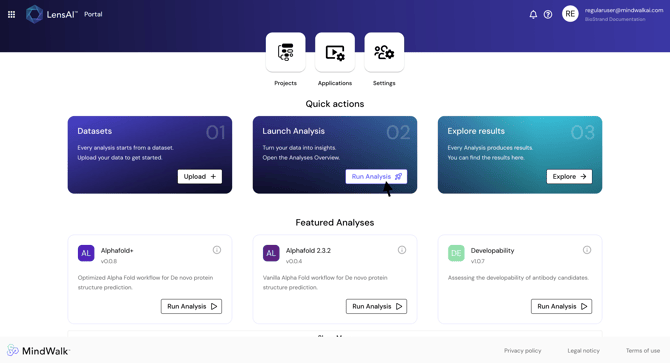
Step 1. On the LensAI™ Home Page, click "Run Analysis"
-
Step 2. Locate the Paratyping analysis and click "Run Analysis"
- Step 3. Inside the run configuration, select an input file from datasets.
Two input file types are supported: CSV and FASTA.
Caution: A single file must be chosen from a dataset, not the dataset itself.
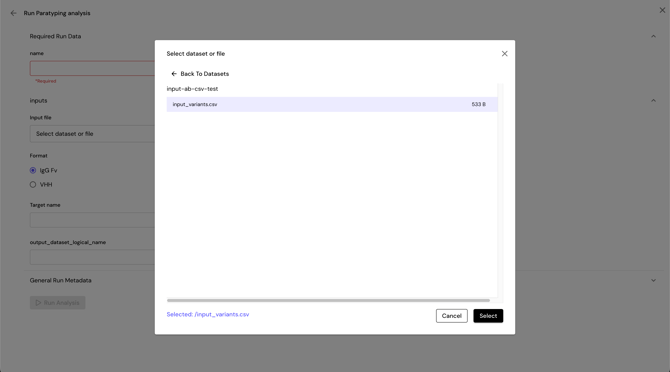
Either a CSV file or a FASTA file should be selected.
Input CSV file: The preferred CSV format includes the following columns:
-
protein_namechain_name(VHindicating heavy chain orVLindicating light chain)chain_sequence(the sequence string)
Each row represents a single chain of a protein. Sequences that share protein_name are taken together as a single (multimeric) protein.
Example of a valid input CSV file:
protein_name,chain_sequence,chain_name
ab1,EVQLVESGGGLVQPGRSLRLSCAASGFTFDDYAMHWVRQAPGKGLEWVSAITWNSGHIDYADSVEGRFTISRDNAKNSLYLQMNSLRAEDTAVYYCAKVSYLSTASSLDYWGQGTLVTVSS,VH
ab1,DIQMTQSPSSLSASVGDRVTITCRASQGIRNYLAWYQQKPGKAPKLLIYAASTLQSGVPSRFSGSGSGTDFTLTISSLQPEDVATYYCQRYNRAPYTFGQGTKVEIK,VL
ab2,QVQLVQSGAEVKKPGASVKVSCKASGFNIKDTYIHWVRQAPGQRLEWMGRIDPANGYTKYDPKFQGRVTITADTSASTAYMELSSLRSEDTAVYYCAREGYYGNYGVYAMDYWGQGTLVTVSS,VH
ab2,DIQMTQSPSSLSASVGDRVTITCKTSQDINKYMAWYQQTPGKAPRLLIHYTSALQPGIPSRFSGSGSGRDYTFTISSLQPEDIATYYCLQYDNLWTFGQGTKVEIK,VL
Input FASTA file: The FASTA file should include each chain as a separate record:
-
- Headers must end with
_VHfor heavy chains and_VLfor light chains. - Both chains of the same antibody must share the same base name (e.g.,
Ab1_VHandAb1_VL).
- Headers must end with
Example of a valid FASTA file:>Atezolizumab_VH
EVQLVESGGGLVQPGGSLRLSCAASGFTFSDSWIHWVRQAPGKGLEWVAWISPYGGSTYYADSVKGRFTISADTSKNTAYLQMNSLRAEDTAVYYCARRHWPGGFDYWGQGTLVTVSS
>Atezolizumab_VL
DIQMTQSPSSLSASVGDRVTITCRASQDVSTAVAWYQQKPGKAPKLLIYSASFLYSGVPSRFSGSGSGTDFTLTISSLQPEDFATYYCQQYLYHPATFGQGTKVEIK
>Bapineuzumab_VH
EVQLLESGGGLVQPGGSLRLSCAASGFTFSNYGMSWVRQAPGKGLEWVASIRSGGGRTYYSDNVKGRFTISRDNSKNTLYLQMNSLRAEDTAVYYCVRYDHYSGSSDYWGQGTLVTVSS
>Bapineuzumab_VL
DVVMTQSPLSLPVTPGEPASISCKSSQSLLDSDGKTYLNWLLQKPGQSPQRLIYLVSKLDSGVPDRFSGSGSGTDFTLKISRVEAEDVGVYYCWQGTHFPRTFGQGTKVEIK
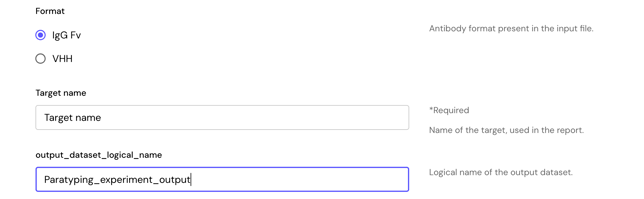
- Step 4. Define options
- Select “VHH” if the input sequences are nanobodies. Otherwise select “IgG Fv”.
- Define “Target name” to be used in the report.
- Step 5. Define the output dataset logical name
- Step 6. Optionally provide experiment details under the General Run Metadata Inputs
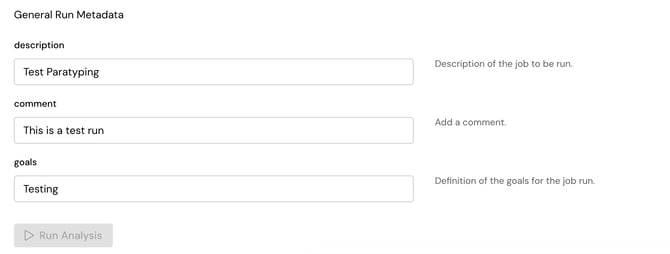
- Step 7. Click "Run Analysis" to launch the application
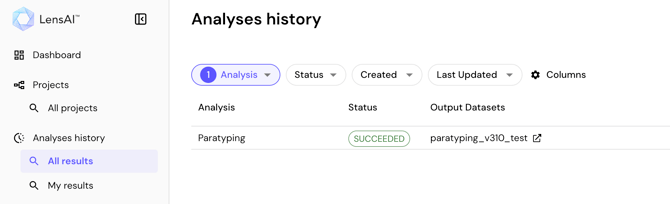
- Step 8. Monitor the analysis state and results in the "Analyses history" sidebar