
What is a Molecular Dynamics simulation?
The GMX applications refer to a set of molecular dynamics (MD) workflows designed to simulate proteins in solvent under specific conditions and use cases. These MD simulations aim to model an ensemble of interacting atoms or molecules over time. In the context of the GMX applications, these are mainly proteins within water, along with some salt ions to simulate a physiological environment.
The workflow begins with the submission of an input molecular model, which is first analyzed for conformity. Once validated, the system is placed inside a simulation box whose size is determined by the dimensions of the molecular system. The box is then filled with water molecules and supplemented with salt ions (Na⁺ and Cl⁻ by default). Periodic boundary conditions are applied so that each water molecule interacts with neighboring periodic images. The simulation box is chosen large enough to prevent direct interactions between periodic images of the protein itself. Together with an appropriate force field, this setup defines a physical system that can evolve over time. The system is represented by two main components: a topology and a set of coordinates. The topology defines the molecular structure and interaction parameters and remains constant throughout the simulation, while the atomic coordinates change over time as the simulation progresses.
The GMX applications refers to different Molecular Dynamics (MD) pipeline which simulate proteins in solvent in specific context:
-
GMX Protein Molecular Dynamics
performs MD simulations of proteins in explicitly modelled solvent without ligands, glycans, DNA, RNA, … (amino acids only). - GMX Membrane-protein Molecular Dynamics
performs MD simulations of transmembrane proteins and peripherical proteins in explicitly modelled solvent along with a cell membrane modelled without ligands, DNA, RNA, … (amino acids only). - GMX Glycoprotein Molecular Dynamics
performs MD simulations of glycosylated proteins in explicitly modelled solvent without ligands, DNA, RNA, … (amino acids only). - GMX Protein-Ligand Molecular Dynamics
performs MD simulations of ligand-protein complexes which have any organic ligands bound via noncovalent bonds in explicitly modelled solvent without DNA, RNA, … (amino acids and small organic molecules only) - GMX Constant-pH Protein Molecular Dynamics: performs MD simulations of proteins in explicitly modelled solvent at constant pH level without ligands, glycans, DNA, RNA, … (amino acids only). The main difference with the standard GMX Protein Molecular Dynamics is that the protonation state of residues are updated during the simulation to maintain the pH level constant.
In addition to the computation of the simulated trajectory, the MD applications output post-processed data, such as the Root Mean Square Deviation of atomic coordinate with respect to the starting conformation, the number of contacts between domains, etc.
How to run a GMX application
GMX applications require structural models as input. Upload existing .PDB models or work from a de novo AlphaFold+ or Immunebuilder output.
Example with GMX Protein Molecular Dynamics
-
Step 1. On the LensAI Home Page, click "Run Analysis"
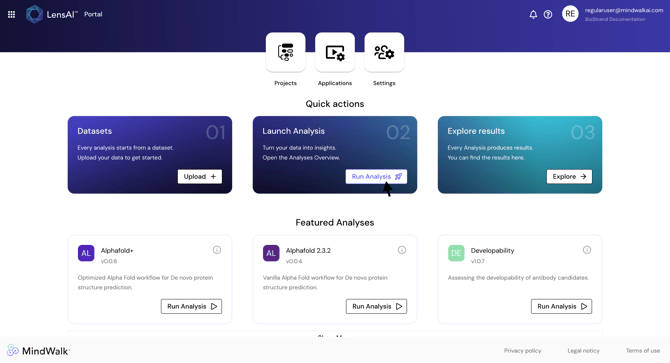
- Step 2. GMX Protein Molecular Dynamics application and click "Run Job"
- Step 3. Inside the run configuration, select the dataset
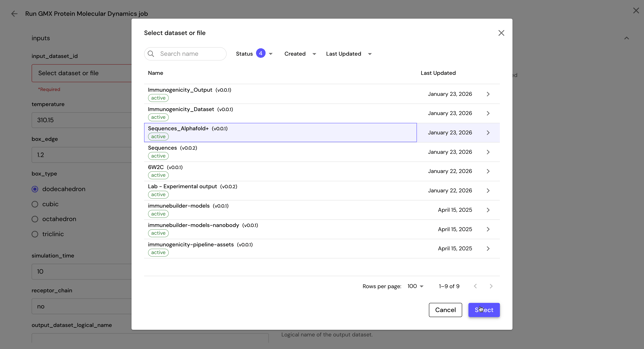
Caution: The dataset must be chosen, not the PDB file itself.
Caution: The PDB model should be clean, there should be no missing residues or gaps. Residues should be properly named.
- Step 4. Define the output dataset logical name
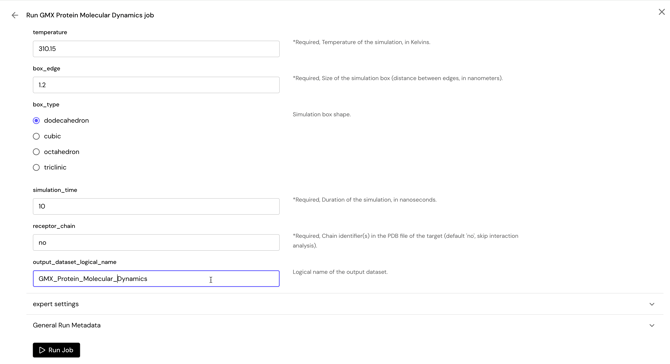
Caution: The name of the output dataset should not contains any space. Underscore is accepted.
-
Step 5. Optionally configure the other inputs
-
- temperature: Temperature of the simulation, in Kelvins. Required
- box_edge: Size of the simulation box (distance between edges, in nanometers). Required
- box_type: Simulation box shape. To be chosen between: dodecahedron, cubic, octahedron or tricilinic.
- simulation_time: Duration of the simulation, in nanoseconds. Required
-
receptor_chain: Chain identifier(s) in the PDB file of the target (default 'no', skip interaction analysis). If specified, additional post-processing analyses will be perform to derive interaction between partners. For instance, if a trimer is submitted with chain A, B and C, and if A is set as the receptor_chain, then the partners will be A and B+C, and the interactions will be computed between them.
- preprocess_pdb: Clean and fix the input protein file by removing all non-protein parts and adding missing atoms.
- add_missing_loops: Be carefull with this option, all missing loops will be added. You should check your input file beforehand!
- inter_ss: If there are interchain disulfide S-S bonds in the input protein (yes/no). Required
- salt_conc: Salt concentration. Required
- positive_ion: Positive ion of the saline solution.
- negative_ion: Negative ion of the saline solution.
- ph: Tweak the protonation state of residues according to pH value. For standard simulation, use 'no'. A "yes" for pH will not lead to a constant pH simulation. Required
- chains_to_cap: Chains to cap with a ACE and NME capping groups at the termini. Required
- mmpbsa_start: Ending trajectory frame for MM-GBSA calculations. Required
- mmpbsa_end: Starting trajectory frame for MM-GBSA calculations. Required
- mmpbsa_interval: Interval between frames for MM-GBSA calculations. Required
- Step 6. Optionally provide experiment details under the General Run Metadata Inputs
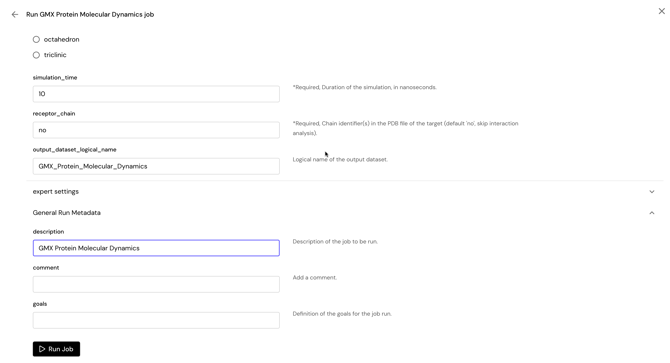
- Step 7. Click "Run Job" to launch the application
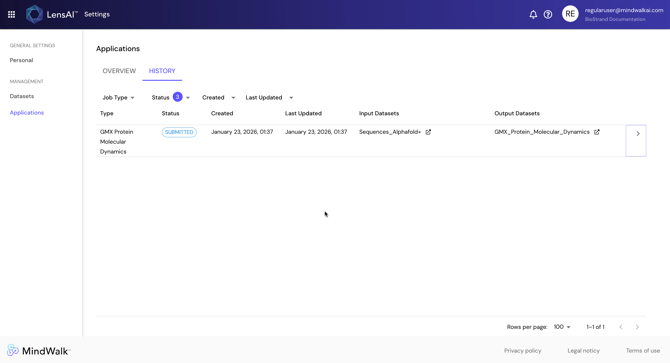
- Step 8. Monitor the state and the results of the analysis in the Jobs page under the History tab
How to read the results
For a standard run, you will find the following output files in the output dataset. This list is not exhaustive, but highlight the most important files for analysis.
-
md.log
The log of the MD simulation, it may contains important information of your simulation. -
md.tpr
The tpr file extension stands for portable binary run input file. This file contains the starting structure of your simulation, the molecular topology and all the simulation parameters. Because this file is in binary format it cannot be read with a normal editor - md.xtc
The md.xtc is the MD trajectory. It contains evolution of all atomic coordinates over time. - md_fit.xtc
This is the same MD trajectory as md.xtc, except that it has been adapted so that the molecule does not jump outside the simulation box. - md_movie.mp4
This is a short visualisation of the trajectory. - rmsd.svg
The RMSD plot (Root Mean Squared Distance) is the measure of the RMSD of atoms with respect of the starting conformation of the molecule in the system (without the solvent), in nanometers (nm). It should start at 0 nm (RMSD between the starting conformation with itself), then it should deviate and oscillate around some values. This indicates how much the structure deviated along the trajectory, the flatter region of the plot are characteristic of a stable conformation, although it is not guaranteed that the system will remains as such along the trajectory, as different conformational local minima can be explored. If the RMSD vary too much or increases, this is a strong indication of an unstable system.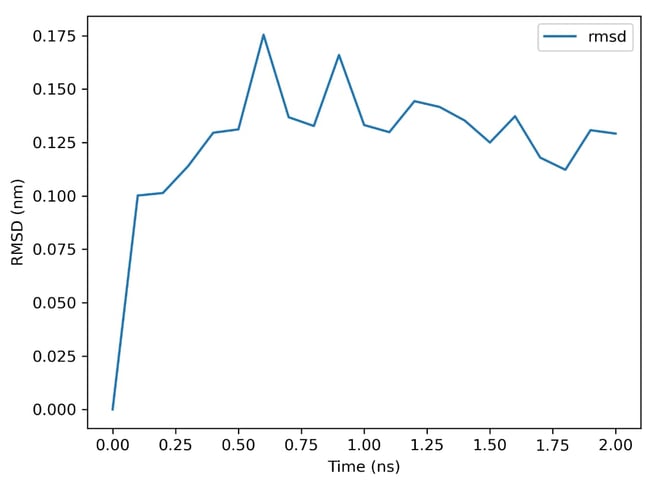
-
rmsf.svg
The RMSF (Root Mean Square Fluctuation) plot represent the time average of the RMSD per residue. Instead of representing a variation over time from a reference structure, the RMSF reveals which amino-acid position fluctuate the most, which is a signature of high mobility and flexibility.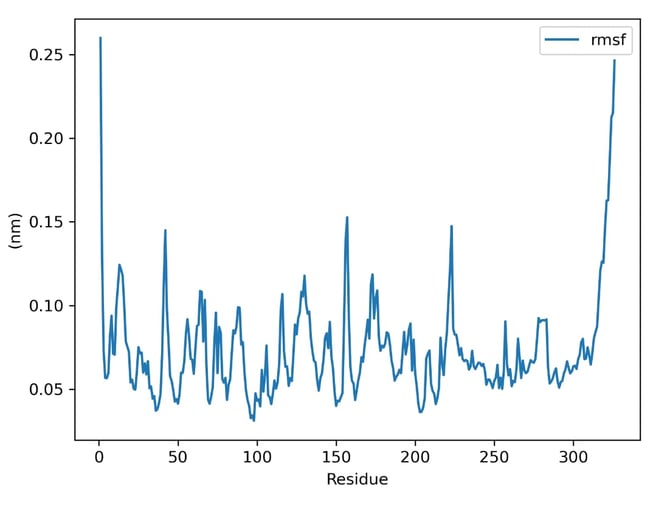
- md0.pdb
This PDB file contains a structural model of the system at the start of the simulation. - md_last.pdb
This PDB file contains a structural model of the system at the end of the simulation (latest trajectory frame). - clusters.pdb
A PDB file containing conformational cluster representatives, highlighting important conformational states along the trajectory. - representative_1.pdb
This PDB file contains a structural model, which has been obtained by performing conformational clustering, and is the most representative of the overall trajectory.
If the simulated system is a protein complex, and that a receptor chain is specified as input, then additional files will appears in the output.
-
interface.matrix@6.0_Ang.svg
This is a heatmap plot of the contacts frequencies, defined with a 6 Angs. interatomic distance threshold between heavy atoms.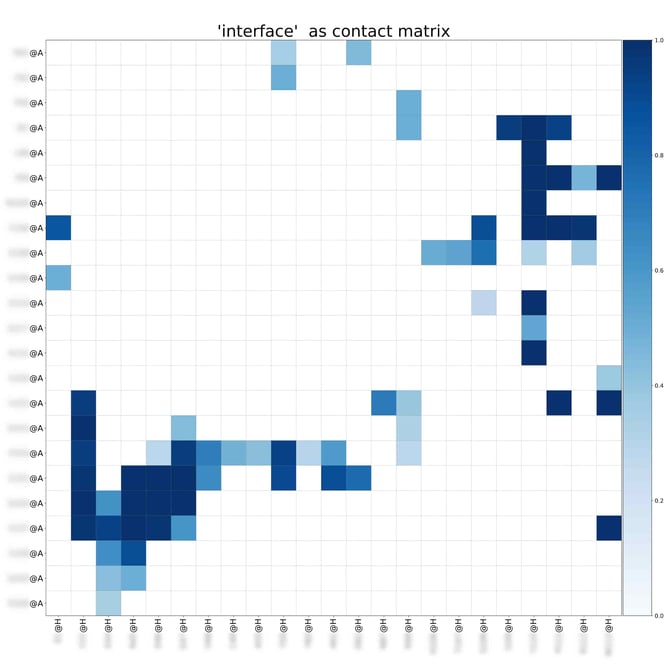
- interface.overall@6.0_Ang.xlsx
The contact frequencies, in Excel format. - time_trace@6.0_Ang.svg
This is the contact distance of residue over time, along the trajectory. - contactnumber.svg
The number of contacts at each trajectory frame. - interface.overall@6.0_Ang.as_bfactors.pdb
The contact frequencies mapped back to the atomic b-factor. Can help visualise interacting residues in 3D. - FINAL_RESULTS_MMPBSA.dat
This file contains the binging energy data (statistics) computed from MM-(PB/GB)SA. - FINAL_DECOMP_MMPBSA.dat
This file contains the binging energy data, computed from MM-(PB/GB)SA decomposed per residues. - FINAL_DECOMP_MMPBSA_total_energy_decomposition_GB_L.svg
This is a plot of the binding energy decomposition per residue, for the partner defined as ligand - FINAL_DECOMP_MMPBSA_total_energy_decomposition_GB_R.svg
This is a plot of the binding energy decomposition per residue, for the partner defined as receptor - FINAL_DECOMP_MMPBSA_total_energy_decomposition_GB_L.svg
This is the raw data of the binding energy decomposition per residue, for the partner defined as ligand - FINAL_DECOMP_MMPBSA_total_energy_decomposition_GB_R.svg
This is the raw data of the binding energy decomposition per residue, for the partner defined as receptor.
Other GMX pipelines
Currently, there are 4 GMX applications for molecular dynamics, as mentioned in the introduction. Most of them are set-up in a similar way as GMX Protein MD, but they differs slightly in term of parameters and outputs. For instance, GMX Constant-pH Protein Molecular Dynamics does not have binding energy information.